

TL;DR:
- Most platforms enable quick stock price alerts with notifications delivered via push, SMS, email, or webhooks. Setting an alert involves searching the stock, selecting a trigger type, specifying a value, choosing delivery channels, and saving it. Using two channels and testing alert triggers can prevent missed or delayed signals.
Yes, you can set an alert on a stock price, and most platforms let you do it in under two minutes. The moment a stock hits your target, you get notified, whether you’re at your desk or away from the screen.
Your fastest options right now:
- Broker app push notification (Robinhood, Fidelity, Schwab): open the app, find the stock, tap the alert icon, set a price target, and save. You’ll get a push notification the moment it triggers.
- Finance apps (Yahoo Finance, Vanguard): look up a quote, tap the Alerts icon, enter a target price, and enable push or email delivery.
- Market-data platforms with webhooks or SMS: more setup, but routes alerts directly to Slack, Discord, or Telegram.
- Handy Markets: set cross-asset price alerts and choose from six delivery channels, including Telegram, Slack, Discord, SMS, webhook, and email, all from one dashboard.
If you want something working in the next five minutes, your broker app or Handy Markets is the place to start.
Table of Contents
- How do you set a stock price alert that works on any platform?
- What types of stock price alerts should you use?
- Where can you set stock price alerts?
- Which notification channel should you use for stock alerts?
- How do you fix missed, late, or duplicate stock price alerts?
- How to set up a Handy Markets stock price alert step by step
- Key Takeaways
- Why alert discipline matters more than alert volume
- Real-time stock alerts across every asset, one platform
- Useful sources
How do you set a stock price alert that works on any platform?
The workflow below applies to virtually every broker app, finance app, or market-data platform. Steps may be labeled differently, but the logic is the same.
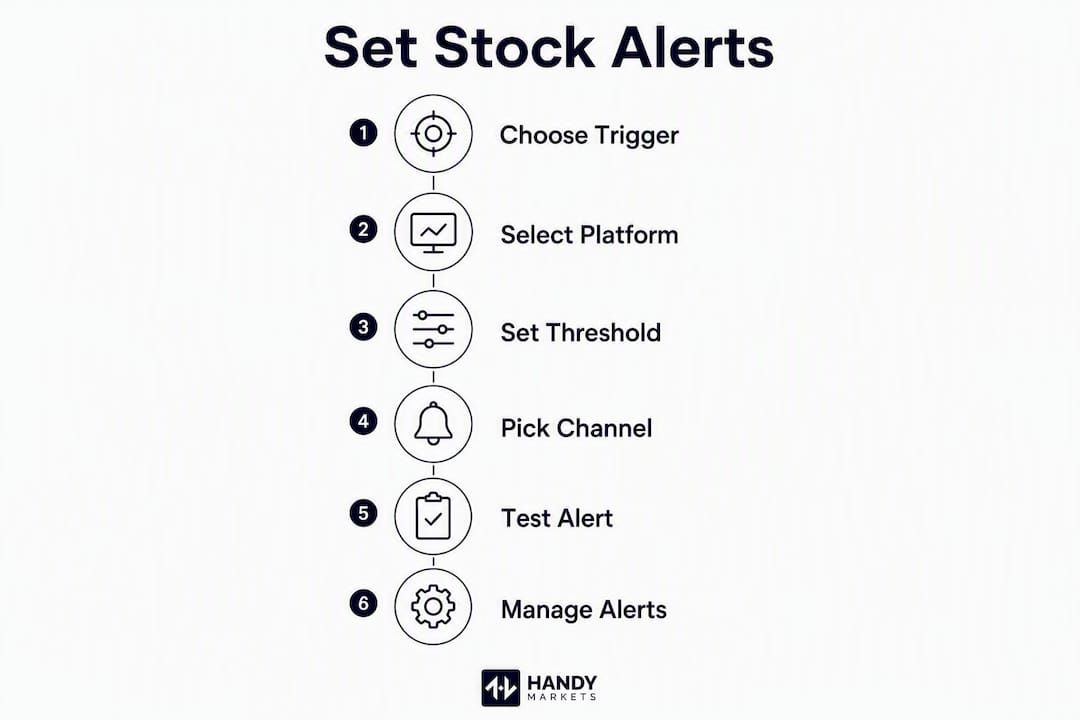
- Find the stock. Search by ticker symbol (e.g., AAPL, TSLA) in the search bar or your watchlist.
- Open the alert or notification panel. Look for a bell icon, an “Alerts” tab, or a three-dot menu on the stock’s quote page. Price alerts are typically accessible directly from an asset’s chart or watchlist row.
- Choose your trigger type. Select from price target (e.g., alert when XYZ hits $42.50), percent change (e.g., 5% move since close), 52-week high/low, or a technical indicator like an EMA cross.
- Set the trigger value. Enter the specific price, percentage threshold, or indicator level. Be precise, but leave a small buffer if you’re using an exact price to account for quote rounding.
- Choose your delivery method. Pick at least one channel: push notification, email, SMS, or webhook. For critical alerts, select two.
- Save and confirm. The platform should show the alert as active. Some apps send a confirmation notification immediately; if yours doesn’t, check the alert center or notification history to verify it saved.
- View and manage active alerts. Most platforms have a dedicated alert center or message center where you can see all active alerts and triggered-alert history.
- Edit or delete. Tap the alert in the center to change the trigger value or delivery channel. Delete alerts you no longer need, since stale alerts create noise.

One-shot vs. persistent alerts: a price-target alert usually fires once and deactivates. A technical indicator alert (like an EMA cross) often stays active until you manually remove it.
Pro Tip: To test an alert without waiting for the market to move, set a temporary target just above or below the current price, confirm it triggers, then reset it to your real target. This catches permission issues before they cost you a signal.
What types of stock price alerts should you use?
Choosing the right trigger type is what separates a useful stock price alarm from one that fires at the wrong moment or not at all.
- Price target alerts — fire when a stock crosses a fixed dollar level, such as $42.50 for an entry or $38.00 as a stop-watch level. These are best for investors with a specific buy or exit price in mind. They’re precise, but they require you to know your number in advance.
Where can you set stock price alerts?
Not every platform fits every trader. Here’s how the main categories compare.
- Broker and trading apps — (Schwab, Fidelity, Robinhood, Vanguard): these are the fastest for order-linked alerts because the alert and your trading account live in the same app. Push notifications are standard; some also offer in-app message centers. Best for day traders and active investors who want to act immediately after an alert fires.
For cross-asset monitoring across stocks, ETFs, crypto, and forex in one place, a dedicated alert platform handles the routing so you don’t have to manage separate apps for each asset class.
Which notification channel should you use for stock alerts?
| Channel | Speed | Reliability | Cost | Best for |
|---|---|---|---|---|
| Push notification | Fastest | High (device-dependent) | Free | Mobile-first traders, quick reactions |
| SMS | Fast | Very high | Usually paid | Backup channel, critical alerts |
| Moderate | High | Free | Searchable history, non-urgent alerts | |
| Webhook | Very fast | Very high | Free (setup required) | Automation, team chat routing |
| Chat apps (Telegram, Slack, Discord) | Fast | High | Free | Team alerts, persistent message threads |
A few caveats worth knowing before you rely on any single channel. Push notifications are the fastest for mobile, but they depend on your device’s notification permissions and battery/focus settings. Watchlist price alerts may be disabled by default and must be manually enabled in your app’s notification settings. SMS is highly reliable but often carries a per-message cost on paid tiers. Email is searchable and good for a record, but it’s slower and can land in spam. Webhooks are the most flexible for automation and routing into team chat, with very low latency once configured.
Pro Tip: For any alert tied to a real trade decision, use two channels. Push plus webhook (routed to Telegram or Slack) is a reliable combination that covers both mobile and desktop without adding cost.
How do you fix missed, late, or duplicate stock price alerts?
When an alert doesn’t fire, work through this checklist before assuming the platform failed.
- Check notification permissions. Go to your device’s system settings and confirm the app has permission to send notifications. This is the most common cause of missed alerts.
- Verify market hours. Price-target alerts on most platforms only trigger during regular trading hours (9:30 AM to 4:00 PM ET). A price reached in after-hours trading may not fire until the next session, or not at all, depending on the platform’s quote source.
- Confirm the quote source and refresh rate. Some free-tier platforms use delayed quotes (15 or 20 minutes). An alert set on a delayed feed can trigger long after the actual price movement.
- Check the alert center. Many platforms deliver triggered alerts to an in-app message center that stays visible until the next trading day. If you missed the push, the history is often still there.
- Look for duplicate alerts. If you’ve set the same alert across multiple platforms, you may get repeated notifications or conflicting triggers. Audit your active alerts regularly and remove stale ones.
For best results: use a price range rather than a single exact price for volatile stocks, set percent thresholds on names with wide daily swings, and build smarter alert configurations that account for normal noise before triggering.
On security: if you’re using webhooks or API keys to route alerts, store keys in environment variables rather than hardcoding them, and grant only the minimum permissions the integration needs.

Pro Tip: Review your full alert list once a week. Alerts for positions you’ve closed or prices far outside the current range create noise that trains you to ignore notifications, which defeats the purpose.
How to set up a Handy Markets stock price alert step by step
Handy Markets supports alerts across stocks, ETFs, crypto, commodities, indices, and forex, all from one dashboard, with six delivery channels.
Three quick configurations by trader profile:
- Long-term investor: — 52-week-high/low alert on a core holding, delivered via Telegram so it reaches you even when you’re not watching the market.
To test a webhook, paste a temporary endpoint from a service like webhook.site into the webhook field, trigger a test alert, and confirm the payload arrives before switching to your real destination.
Pro Tip: Use Handy Markets watchlists to apply alerts to a group of stocks at once. Pair a percent-change alert (early warning) with a price-target alert (final entry signal) on your highest-conviction names, and route both to different channels for redundancy.
Key Takeaways
Setting an alert on a stock price requires choosing the right trigger type first, then selecting at least two delivery channels to avoid missed signals.
| Point | Details |
|---|---|
| Choose trigger type first | Decide between price target, percent change, 52-week high/low, or technical indicator before setting any value. |
| Use two delivery channels | Pair push with webhook or SMS for critical alerts; single-channel setups are vulnerable to permission failures. |
| Test before you rely on it | Set a temporary near-price target to confirm the alert fires, then reset it to your real level. |
| Review alerts weekly | Stale alerts on closed positions create noise and reduce your response to real signals. |
| Handy Markets for multi-channel | Handy Markets covers stocks, ETFs, crypto, and more with six delivery channels from a single dashboard. |
Why alert discipline matters more than alert volume
Most traders set too many alerts and act on too few. The real edge isn’t having a stock price alert system that fires constantly; it’s having a small set of well-chosen alerts tied to levels where you’ve already decided what to do. An alert that fires and finds you without a plan is just noise with extra steps.
The approach that holds up in practice is tiered: an early-watch percent alert (say, 2% intraday) to flag that something is moving, paired with a price-target alert at the exact level where you’d act. The first alert says “pay attention.” The second says “decide now.” Keeping persistent alerts only on high-conviction names prevents the fatigue that comes from a notification feed that never stops.
Real-time stock alerts across every asset, one platform
Watching six different apps for price moves across stocks, ETFs, and crypto is the kind of friction that makes traders miss signals. Handy Markets puts live stock quotes, charts, and price alerts in one place, with delivery to the channels you already use.
Set a price-target or percent-change alert on any stock, then route it to Telegram, Slack, Discord, SMS, webhook, or email. Connect your watchlists, apply alerts in bulk, and use redundant channels for your most important positions. Cross-asset coverage means the same workflow applies whether you’re watching a tech stock, a commodity ETF, or a crypto position.
Visit Handy Markets to set your first alert and see live prices across every major asset class.
Useful sources
- Price alerts | Robinhood — how to set and manage price alerts from charts and watchlists
- Price Alerts, Fidelity Active Trader Tools Help — trigger types including EMA crosses, delivery options, and alert center behavior
- Set and receive custom price alerts | Yahoo Help — mobile workflow for setting a custom price target on Yahoo Finance for Android
- Set an alert for a stock you’re watching | StockCharts — simple and technical alerts, membership tier limits, and alert-as-monitoring-tool guidance
- Price Alerts | Investing.com — cross-asset and economic-event alerts with desktop and smartphone delivery
- Get email alerts for stocks & ETFs | Vanguard — Vanguard’s alert messaging options for holdings and watchlists
- Handy Markets price alert setup — step-by-step setup for multi-channel alerts across stocks, crypto, ETFs, and more