

Price alerts for stocks notify you the moment a ticker crosses a price level, percent threshold, or indicator signal you define — no screen-watching required. The fastest way to get them running: pick a symbol, set a trigger, and enable at least two delivery channels. Here are three things you can do right now, in under two minutes:
- Open your broker app or a dedicated alert platform and search for a ticker you hold or watch.
- Set a simple price target or a 5% move trigger, choose push notification plus one backup channel (SMS or email), and save.
- Send a test alert to confirm delivery before the market opens.
That’s the whole foundation. Everything below builds on it.
Key Takeaways
Setting a basic price alert with at least two delivery channels is the single most effective step any investor or trader can take to stay informed without watching screens all day.
| Point | Details |
|---|---|
| Start with two channels | Enable push plus one backup (SMS, Telegram, or email) so a single channel failure doesn’t mean a missed alert. |
| Test before you trust | Fire a demo alert at a near-current price before market open to confirm delivery is live. |
| Keep advanced rules simple | Multi-condition alerts reduce noise but must be interpretable; back-test on historical data before relying on them. |
| Match latency to your strategy | Free tiers often carry 15-minute delays; active traders need real-time feeds to act on breakout or stop-loss signals. |
| Handy Markets for omnichannel coverage | Handy Markets delivers real-time stock alerts via Telegram, Discord, Slack, SMS, webhooks, and email from a single setup. |
Table of Contents
- How to set price alerts for stocks, step by step
- How to build conditional and indicator-based alerts traders use
- Which delivery channels should you use, and why omnichannel matters
- Broker app vs dedicated service vs market-data platform: which fits you?
- Real-time vs delayed data: what latency costs you
- Practical rules to reduce noise and make alerts actionable
- Why omnichannel alerts are the real edge in modern trading
- Handy Markets covers real-time stock alerts across every channel you need
- Sources
How to set price alerts for stocks, step by step
The core workflow is the same whether you use a broker app or a standalone platform. Follow these steps for any basic alert:
- Search for the symbol. Enter the ticker (e.g., AAPL, TSLA, SPY) in the search bar.
- Choose a trigger type. Select either an absolute price (notify me when AAPL reaches $200) or a percent move (notify me when TSLA moves 5% in a session). Robinhood’s price alert setup, for example, defaults to 5% and 10% move thresholds as quick-start options.
- Set the direction. Specify above or below your target. A buy-watch alert sits above current price; a risk-limit alert sits below.
- Select delivery channels. Enable at least two: push notification for speed, plus email or SMS as a fallback.
- Save and test. Trigger a test notification or set a near-term demo alert (e.g., a price just $0.01 away from current) to verify delivery before you rely on it.
Three alert templates you can copy today
- Buy watch: Ticker rises above your target entry price. Example: NVDA > $950. Delivery: push + email.
- Risk limit / stop watch: Ticker falls below your cost basis minus a defined buffer. Example: MSFT < $380. Delivery: push + SMS.
- Earnings / volatility watch: Ticker moves more than 7% in either direction on a known catalyst date. Delivery: push + Telegram for a persistent record.
For a deeper walkthrough with platform-specific screenshots, the Handy Markets guide to setting an alert on stock price covers the full setup flow.
Pro Tip: Set a demo alert at a price just a cent away from the current quote, let it fire, then delete it. This confirms your channel is live before a real move happens.
How to build conditional and indicator-based alerts traders use
Basic price-level alerts are a starting point. Active traders layer in conditions to filter noise and act only on higher-conviction signals.
Common advanced triggers include:
- Percent move + volume spike: Price moves 3% AND volume exceeds 150% of the 20-day average. Volume confirmation separates a real breakout from a thin-market drift.
- SMA/EMA cross: Price crosses above the 50-day simple moving average (SMA50). Useful for trend-following entries.
- RSI threshold: RSI drops below 30 (oversold) or rises above 70 (overbought). Pairs well with a price-level trigger.
- MACD crossover: The MACD line crosses above the signal line, suggesting upward momentum.
- Support/resistance breach: Price crosses a defined horizontal level that has held for multiple sessions.
Chaining conditions is where alerts become genuinely powerful. A rule like price > SMA50 AND RSI < 30 AND volume > 1.5x average filters out most false signals and surfaces only setups where multiple factors align. The Scalping-Algo guide to efficient trading alerts covers practical configurations for traders who need fast, precise triggers.
One honest warning: the more conditions you stack, the fewer alerts fire. That’s often a feature, not a bug, but overfitting a rule to past price behavior can leave you with an alert that never triggers in real market conditions. Keep rules interpretable. If you can’t explain in one sentence why the rule should work, simplify it.
Pro Tip: Before relying on a multi-condition alert, back-test the rule manually on three to six months of historical data. Count how many times it would have fired and whether those moments were actually actionable.
Which delivery channels should you use, and why omnichannel matters
Modern alert services support a wide range of delivery channels, and choosing the right mix matters as much as the trigger itself. OpenStatus’s notification channel documentation lists the common options: Telegram, Discord, Slack, SMS, WhatsApp, webhooks, and email.
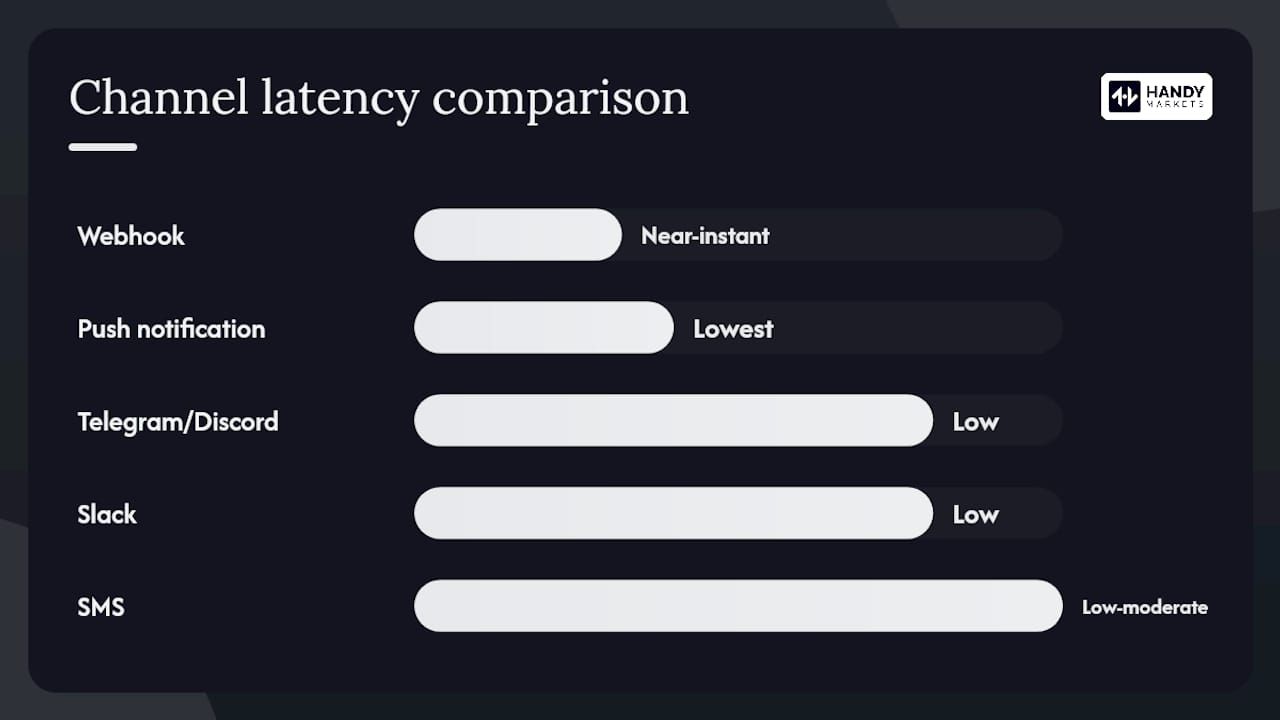
| Channel | Best for | Latency | Reliability notes |
|---|---|---|---|
| Push notification | Immediate awareness on mobile | Lowest | Subject to OS throttling when battery saver is active |
| SMS | Offline or low-connectivity situations | Low to moderate | Carrier delays possible; no internet needed |
| Record-keeping, non-urgent alerts | Moderate | Reliable but slow for fast-moving markets | |
| Telegram / Discord | Persistent chat log, team sharing | Low | Requires app install; excellent for alert history |
| Slack | Team or portfolio-group coordination | Low | Best for shared watchlists in a group context |
| Webhook | Automation, bots, logging | Near-instant | Requires a receiving endpoint; most flexible |
Integration flows worth knowing
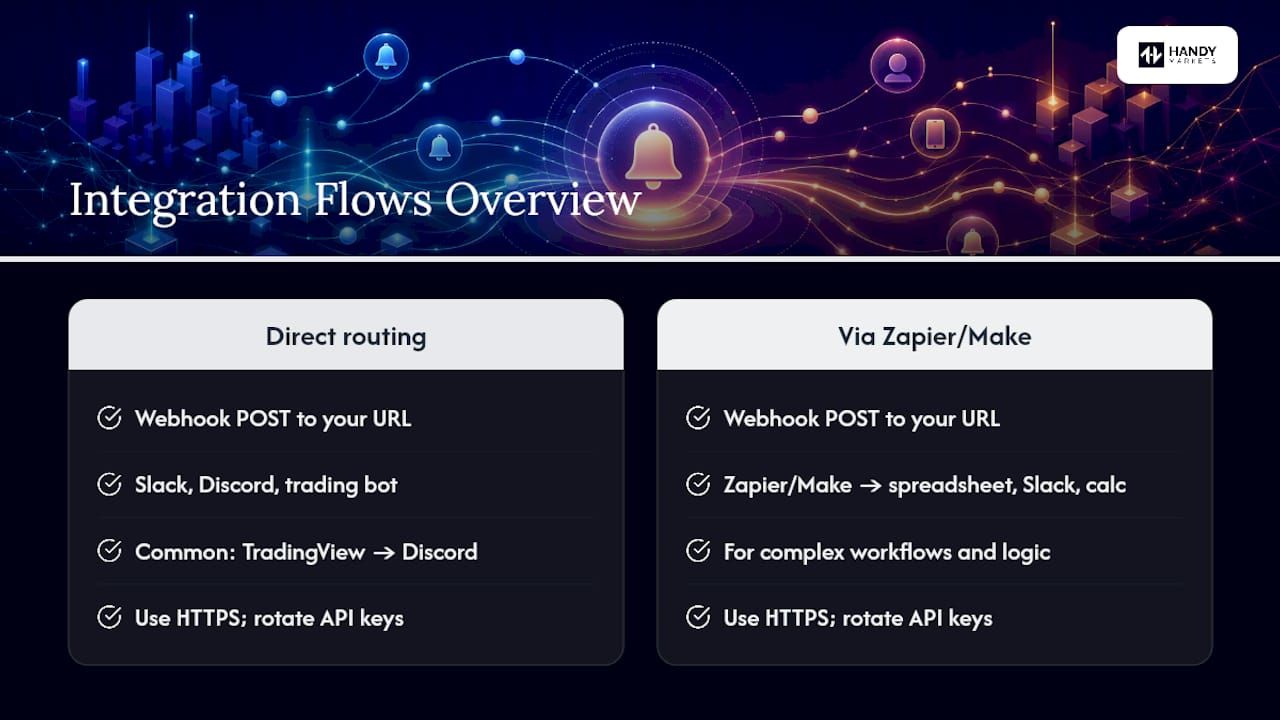
Webhooks are the backbone of alert automation. A typical flow looks like this: your alert platform fires a webhook POST request to a URL you control, which then routes the payload into Slack, Discord, or a trading bot. Forwarding TradingView webhook alerts to Discord is one of the most documented patterns, and the same logic applies to any webhook-capable alert service.
For more complex workflows, a webhook can feed into a tool like Zapier or Make (formerly Integromat), which then triggers a spreadsheet log, a Slack message, or a position-sizing calculation. When building these flows, always use HTTPS endpoints and rotate API keys regularly. Safe automation workflows for traders cover the key security and reliability considerations worth reading before you connect alerts to any automated order system.
Multi-channel redundancy isn’t optional for high-conviction trades. Push notifications can be throttled by your phone’s OS; SMS can be delayed by carriers. Running push plus Telegram plus SMS means a missed alert on one channel is caught by another.
Broker app vs dedicated service vs market-data platform: which fits you?
Each option has a distinct profile, and the right choice depends on what you actually need.
Broker apps (built-in alerts from your trading platform):
- Free and already connected to your positions
- Limited to assets your broker supports
- Delivery usually restricted to push and email
- No webhooks, no cross-broker watchlists
- Best for: casual investors who want simple level alerts on holdings they already own
Dedicated alert apps (standalone stock alert services):
- Broader ticker coverage, often including pre-market and after-hours
- More delivery channels, including SMS and sometimes phone calls
- Tiered pricing that often gates SMS or advanced triggers behind paid plans
- Best for: active traders who need multi-channel delivery and conditional triggers across many tickers
Market-data platforms (like Handy Markets stocks):
- Real-time quotes, charts, and alerts in one place
- Multi-channel delivery including Telegram, Discord, Slack, SMS, webhooks, and email
- Cross-asset coverage (stocks, ETFs, crypto, forex, commodities)
- Best for: traders and investors who want one dashboard for monitoring and alerting across asset classes
A quick decision checklist
Which option fits your situation?
- Do you need alerts only on positions you already hold at one broker? Use the broker’s built-in alerts.
- Do you need SMS, Telegram, or webhook delivery? Move to a dedicated service or market-data platform.
- Do you track multiple asset classes (stocks, ETFs, crypto)? A market-data platform covers all of them in one place.
- Do you want to automate responses to alerts (logging, bots, position sizing)? You need webhook support.
Real-time vs delayed data: what latency costs you
The gap between real-time and delayed data is the most underappreciated variable in alert setup. A 15-minute delayed feed is standard for free tiers on many platforms. For a long-term investor watching a monthly price target, that delay is irrelevant. For a swing trader watching a breakout level, 15 minutes is the difference between acting on a signal and chasing a move that already happened.
Here’s what to expect across common pricing tiers:
- Free tiers: Typically 15-minute delayed data, limited to push or email delivery, and a cap on the number of active alerts (often 5–10).
- Entry-level paid plans: Real-time or near-real-time data, SMS delivery unlocked, higher alert limits. Pricing for these tiers varies widely across services.
- Premium plans: Real-time data across multiple exchanges, webhook support, unlimited alerts, and priority delivery. These plans are aimed at active traders and portfolio managers who need speed and volume.
To test a service’s latency yourself, set an alert at the current bid price during market hours and time how long it takes to fire after the price ticks through. Repeat it twice. If the delay is consistently above 30 seconds for a service claiming real-time data, treat that as a red flag. For more on tracking live prices and testing data feeds, the Handy Markets guide to following live market prices walks through practical methods.
Practical rules to reduce noise and make alerts actionable
Alert fatigue is a real problem. When every alert feels urgent, none of them are. The fix is a priority matrix that sorts alerts before they fire.
A three-tier priority framework
- Critical alerts require immediate review and a potential trade decision. These are alerts tied to positions you hold, with tight triggers. Examples: a holding drops more than 5% intraday on above-average volume; a stop-loss level is breached; an earnings surprise moves a core position more than 8%.
- Important alerts are worth reviewing within the hour but don’t demand an instant response. Examples: a watchlist stock crosses a key SMA; RSI on a tracked ticker hits an extreme; a sector ETF moves more than 3%.
- Informational alerts are for awareness and research. Examples: a macro index crosses a round number; a commodity you track moves more than 2% overnight.
Three ready-to-use alert rules
- Critical: Price drops >5% intraday on a current holding AND volume is above 150% of the 20-day average. Delivery: push + SMS.
- Important: Ticker crosses above SMA50 on a watchlist stock. Delivery: Telegram (persistent log).
- Informational: SPY moves more than 1.5% before 10:30 AM. Delivery: email digest.
For frequency controls, most platforms let you set a cooldown period so the same alert doesn’t fire repeatedly in a volatile session. Use it. A 30-minute snooze on informational alerts keeps your phone quiet without missing a genuine move. The Handy Markets guide to smarter alerts covers digest settings and frequency controls in more detail.
Pro Tip: Review your active alert list every two weeks. Delete alerts for positions you’ve closed and tighten triggers on positions that have moved significantly. A stale alert list is almost as useless as no alerts at all.
Why omnichannel alerts are the real edge in modern trading
Most traders set one alert, on one channel, and call it done. That’s a fragile setup. The market doesn’t care that your push notification was throttled or that your carrier delayed an SMS by four minutes. Speed and redundancy aren’t luxuries for active traders — they’re the architecture of a disciplined response system.
What we find most underappreciated is the connection between alert design and trade discipline. A well-structured alert doesn’t just tell you something happened; it tells you what to do next. An alert that fires with a clear condition (price crossed SMA50 AND RSI < 35) removes ambiguity at the moment of decision. That’s the difference between reacting and executing.
The traders who get the most from alert systems aren’t the ones with the most alerts. They’re the ones who’ve thought carefully about which signals actually precede the moves they want to trade, and who’ve built delivery redundancy so those signals reach them every time.
Handy Markets covers real-time stock alerts across every channel you need
Handy Markets delivers real-time price alerts for stocks across six channels simultaneously: Telegram, Discord, Slack, SMS, webhooks, and email. You don’t have to choose one and hope it works. Set a trigger once, and the alert reaches you through whichever channel you’re actually watching at that moment.
The platform covers stocks, ETFs, crypto, forex, commodities, and indices in one dashboard, so you’re not juggling separate tools for each asset class. Conditional triggers, customizable thresholds, and watchlist management are all included. For U.S. investors and traders, setup takes under two minutes: visit the Handy Markets price alert page, search your ticker, define your trigger, and select your channels. A free tier is available to get started without a commitment.
Sources
Resources for building and testing your alert workflow: