


What does a real-time price alert system actually do?
A real-time price alert system monitors live market data and fires a notification the instant an asset’s price crosses a threshold you define. No polling delays, no middlemen, no missed moves. The core components are straightforward: a data source (WebSocket stream or REST API), an alert rule engine that evaluates incoming prices against your conditions, a notification dispatcher that routes messages to Telegram, email, or another channel, and a main application loop that ties everything together.
“Alert effectiveness relies more on clean input parameters and precise thresholds than elaborate code. Define a concrete buy-now price, including total cost, and your alerts become genuinely actionable conditions rather than noise.”
Latency is the heartbeat of this entire system. Standard broker apps route push notifications through Apple or Google servers, adding anywhere from 10 to 47 seconds of delay. A custom Python stack using the Finnhub WebSocket API and Telegram Bot API delivers very fast alerts, putting you ahead of that curve entirely.
The four modules we will build:
- Data acquisition: WebSocket connection to Finnhub for US equities; CoinGecko REST polling for crypto
- Alert engine: threshold evaluation with cooldown logic, backed by SQLite
- Notification dispatch: Telegram Bot API as primary; SMTP email as fallback
- Main loop: async orchestration subscribing to symbols and routing triggered alerts
How to set up your technology stack and environment
Python is the right choice here. Its ecosystem covers WebSocket clients, HTTP requests, async I/O, and lightweight databases without friction. Target Python 3.8 or higher.
Required libraries:
- websocket-client for persistent WebSocket connections
- requests for REST API calls and Telegram dispatch
- sqlite3 (built-in) for storing alert rules and history
- redis (optional) for high-frequency caching
- python-dotenv for environment variable management
Environment setup steps:
- Create a virtual environment: python -m venv alertenv && source alertenv/bin/activate
- Install dependencies: pip install websocket-client requests python-dotenv redis
- Store API keys in a .env file, never hardcoded: FINNHUB_KEY, TELEGRAM_BOT_TOKEN, TELEGRAM_CHAT_ID
- Register for a free Finnhub API key at finnhub.io (no credit card required)
- Create a Telegram bot via @BotFather and note your token and chat ID
For deployment, a $4–$5/month VPS running Linux works well. Alternatively, the system runs comfortably on a Raspberry Pi Zero 2 W using roughly 18MB of RAM, which makes it a genuinely low-cost production option.
Pro Tip: Use python-dotenv to load your .env file at startup. Hardcoding API keys in source files is the fastest way to accidentally expose credentials in a public repository.
How do you connect to real-time market data streams?
WebSockets give you a persistent, low-latency connection where the server pushes data to you the moment a trade executes. Finnhub’s free WebSocket tier covers real-time US stock trades for up to 30 symbols simultaneously.

Basic Finnhub WebSocket connection in Python:
import websocket, json, os
from dotenv import load_dotenv
load_dotenv()

FINNHUB_KEY = os.getenv("FINNHUB_KEY")

def on_message(ws, message):
    data = json.loads(message)
    if data.get("type") == "trade":
        for trade in data["data"]:
            check_alerts(trade["s"], trade["p"])

def on_open(ws):
    for symbol in ["AAPL", "NVDA", "TSLA"]:
        ws.send(json.dumps({"type": "subscribe", "symbol": symbol}))

ws = websocket.WebSocketApp(
    f"wss://ws.finnhub.io?token={FINNHUB_KEY}",
    on_message=on_message, on_open=on_open
)
ws.run_forever()
For crypto prices, CoinGecko’s public REST endpoint requires no API key and covers over 10,000 coins. Its free tier rate limit allows roughly 10–30 calls per minute, so a 60-second polling interval keeps you safely within bounds.
Numbered steps for adding CoinGecko polling:
- Call https://api.coingecko.com/api/v3/simple/price?ids=bitcoin&vs_currencies=usd
- Parse the JSON response: data["bitcoin"]["usd"]
- Pass the price to your alert engine
- Sleep 60 seconds before the next call
Pro Tip: During market open (9:30–9:35 AM ET), Finnhub delivers thousands of messages per second for popular tickers. Only evaluate the last trade in each batch rather than every fill. You care about the current price, not every individual execution.
How does the alert rule engine evaluate price conditions?
The engine compares each incoming price against stored rules and fires when a condition is met. Two design decisions matter most: precise threshold definitions and a cooldown mechanism to prevent notification spam during volatile sessions.
Core engine logic with SQLite and cooldown:
import sqlite3
from datetime import datetime, timedelta

def is_in_cooldown(last_triggered, cooldown_minutes=5):
    if not last_triggered:
        return False
    return datetime.now() < last_triggered + timedelta(minutes=cooldown_minutes)

def check_alerts(symbol, price):
    conn = sqlite3.connect("alerts.db")
    cursor = conn.cursor()
    cursor.execute(
        "SELECT id, condition, threshold, last_triggered FROM alert_rules "
        "WHERE symbol=? AND is_active=1", (symbol,)
    )
    for rule_id, condition, threshold, last_triggered in cursor.fetchall():
        triggered = (condition == "above" and price > threshold) or \
                    (condition == "below" and price < threshold)
        if triggered and not is_in_cooldown(last_triggered):
            dispatch_alert(symbol, price, condition, threshold)
            cursor.execute(
                "UPDATE alert_rules SET last_triggered=? WHERE id=?",
                (datetime.now().isoformat(), rule_id)
            )
    conn.commit()
conn.close()- Define exact price levels, not vague ranges
- Set one rule per symbol per direction (above/below)
- Store last_triggered timestamps per rule to enforce the cooldown
- Log every triggered alert to an alert_history table for auditing
Numbered steps to add a rule:
- Insert a row into alert_rules with symbol, condition (“above” or “below”), and threshold
- Set is_active = 1 and last_triggered = NULL
- The engine loads active rules on startup and re-evaluates on every incoming tick
Pro Tip: Retail platforms like Robinhood default to 5% and 10% movement thresholds for informational alerts. For trading decisions, you almost always want absolute price levels, not percentage bands, because percentage thresholds fire on noise as often as on signal.
What is the fastest way to dispatch alert notifications?
Telegram Bot API is the best primary channel for low-latency mobile delivery. Messages arrive within 100–400 milliseconds of the API call, making it far faster than routing through a broker’s notification infrastructure.

Telegram dispatch function:
import requests, os

BOT_TOKEN = os.getenv("TELEGRAM_BOT_TOKEN")
CHAT_ID = os.getenv("TELEGRAM_CHAT_ID")

def dispatch_alert(symbol, price, condition, threshold):
    direction = "above" if condition == "above" else "below"
    text = f"ALERT: {symbol} crossed {direction} ${threshold:.2f}
Current: ${price:.2f}"
    requests.post(
        f"https://api.telegram.org/bot{BOT_TOKEN}/sendMessage",
        json={"chat_id": CHAT_ID, "text": text}
    )
Notification channel options:
- Telegram Bot API: sub-second delivery, free, direct to mobile
- SMTP email: use Python’s smtplib with Gmail or SendGrid; reliable but slower
- Slack webhooks: useful for team-based monitoring via requests.post to a webhook URL
Error handling steps:
- Wrap every requests.post in a try/except block
- On failure, log the error and retry after 2 seconds
- After three consecutive failures, write the unsent alert to a local queue file
How do you wire the engine and dispatcher into one working program?
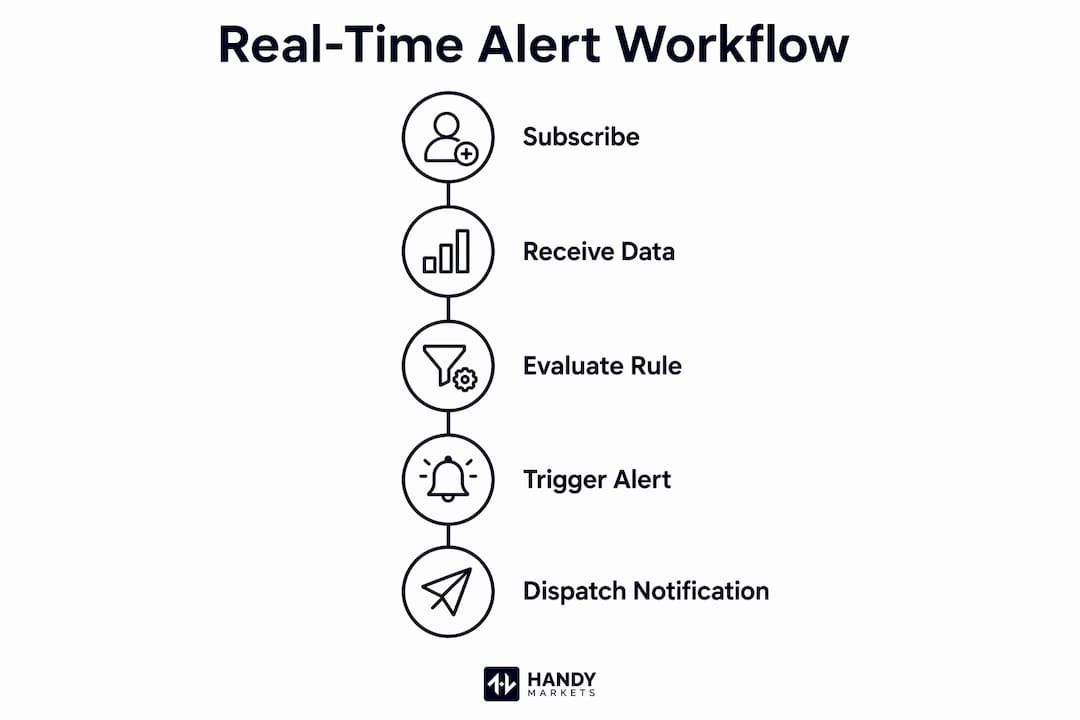
The main loop subscribes to symbols, receives ticks via WebSocket, passes each price to the alert engine, and fires the dispatcher when a rule triggers. Keeping this flow linear and synchronous works well for up to 30 symbols; async I/O with asyncio becomes worthwhile beyond that.
Minimal working integration:
import websocket, json, os
from dotenv import load_dotenv
load_dotenv()

def on_message(ws, message):
    data = json.loads(message)
    if data.get("type") == "trade":
        for trade in data["data"]:
            check_alerts(trade["s"], trade["p"])

def on_open(ws):
    symbols = ["AAPL", "NVDA", "AMD"]
    for sym in symbols:
        ws.send(json.dumps({"type": "subscribe", "symbol": sym}))

def on_close(ws, status, msg):
    import time; time.sleep(5)
    connect()

def connect():
    ws = websocket.WebSocketApp(
        f"wss://ws.finnhub.io?token={os.getenv('FINNHUB_KEY')}",
        on_message=on_message, on_open=on_open, on_close=on_close
    )
    ws.run_forever()

connect()
Runtime considerations:
- The script idles at near-zero CPU between market hours
- WebSocket ping/pong frames keep the connection alive automatically
- Reconnect logic in on_close handles Finnhub’s 24-hour session limit
Pro Tip: Run the script inside a tmux session or register it as a systemd service so it survives SSH disconnects and reboots without manual intervention.
What advanced features make your alert system more powerful?
Once the base system works, a few extensions add real trading edge. Volume spike detection, percentage-move alerts, and digest notifications all build on the same WebSocket feed you already have.
High-value extensions:
- Volume spike alerts: accumulate trade volume over a 60-second rolling window per symbol; fire when volume exceeds a historical average by a meaningful multiple
- Percentage-move alerts: calculate (current_price - open_price) / open_price on each tick and trigger on a defined percentage threshold
- Multi-symbol digest: batch alerts that fire within a 30-second window into a single Telegram message instead of separate pings
- Redis caching: store the latest price per symbol in Redis for sub-millisecond reads when multiple workers share state
For persistent rule storage, SQLite handles personal use cleanly. When you need concurrent writes from multiple processes, Redis or PostgreSQL scales better. You can also track live market prices across asset classes to calibrate your thresholds against real market conditions before going live.
Pro Tip: Implement alert grouping by setting a 30-second buffer. Collect all alerts that fire in that window and send one consolidated message. During earnings season, a single stock can cross multiple thresholds in seconds, and a flood of individual pings is harder to act on than one clear summary.
How do you deploy and keep your alert system running reliably?
Production reliability comes down to three things: auto-reconnect, health monitoring, and secure key management.
Deployment checklist:
- Host on a Linux VPS ($4–$5/month) or a Raspberry Pi with a stable internet connection
- Register the script as a systemd service with Restart=always so it recovers from crashes automatically
- Use Docker if you want portable, reproducible deployments across environments
- Implement exponential backoff in your reconnect handler: start at 1 second, double on each failure, cap at 30 seconds
- Add a health-check cron that sends a Telegram heartbeat every 10 minutes during market hours; silence means something broke
- Store all API keys in environment variables or a secrets manager, never in version-controlled files
- Rotate API keys quarterly and audit access logs for unexpected usage patterns
For traders who want a no-code starting point while building their custom system, Handy Markets price alerts cover Telegram, Discord, Slack, SMS, webhooks, and email across stocks, crypto, and commodities with zero setup friction.
Which APIs minimize latency in real-time alert systems?
WebSockets beat polling on every latency metric that matters for trading. A REST polling loop at 60-second intervals misses every price move that happens between calls. A persistent WebSocket delivers each trade within milliseconds of execution.
API comparison by latency profile:
- Finnhub WebSocket: real-time US stock trades, free tier covers 30 symbols, data arrives within milliseconds of exchange execution
- CoinGecko REST: crypto prices with a 60-second polling interval on the free tier; adequate for swing-trade alerts, too slow for scalping
- Telegram Bot API: message delivery in 100–400 ms, making it the fastest practical mobile notification channel available at zero cost
Technically proficient traders build custom systems primarily to gain a latency advantage over standard broker notifications. Broker apps routing through Apple or Google push servers add 10–47 seconds of delay. A custom WebSocket plus Telegram pipeline cuts that to under two seconds end-to-end.
Statistic callout: Custom alert systems using Finnhub WebSocket and Telegram Bot API deliver notifications in well under two seconds end-to-end, compared to broker app delays that can reach 47 seconds.
How do you handle data latency and consistency issues?
Network jitter and out-of-order messages are facts of life with any streaming data feed. The practical fix is to timestamp every incoming trade at receipt and discard any message older than your alert evaluation window. For price consistency, always evaluate the most recent trade in a batch rather than processing each fill sequentially, since batched WebSocket messages may arrive slightly out of order.
Clock synchronization matters too. If your server clock drifts, cooldown calculations based on datetime.now() become unreliable. Use NTP-synced system time and store all timestamps in UTC. When comparing a rule’s last_triggered value against the current time, always convert both to UTC before the comparison.
How do you scale the alert system for high-frequency data streams?
A single-threaded Python loop handles 30 symbols cleanly. Beyond that, the bottleneck shifts to message processing speed. The solution is to separate concerns: one process handles the WebSocket connection and writes raw ticks to a Redis queue, while one or more worker processes consume from that queue and run the alert engine independently.
This producer/consumer pattern lets you add workers horizontally without touching the data feed. Redis lists work well as the queue primitive here. For very high symbol counts, consider partitioning symbols across multiple WebSocket connections, each feeding its own queue partition. A stock portfolio tracker with alert notifications can serve as a useful reference for how production-grade systems handle multi-asset monitoring at scale.
How do you test and debug real-time alert systems?
Testing a live WebSocket system requires a mock data layer. Build a simple replay function that reads a JSON file of historical trade messages and feeds them to on_message at controlled intervals. This lets you verify that threshold crossings, cooldown logic, and Telegram dispatch all work correctly without waiting for live market conditions.
For debugging, log every incoming tick to a rotating file with Python’s logging module at DEBUG level during development, then switch to INFO in production. Add explicit log lines when an alert fires, when a cooldown blocks a trigger, and when a WebSocket reconnect occurs. Those three events cover the vast majority of issues you will encounter in the first weeks of running the system live.
Key Takeaways
A custom Python alert system using Finnhub WebSocket and Telegram Bot API delivers notifications in well under two seconds end-to-end, compared to broker app delays that can reach 47 seconds.
| Point | Details |
|---|---|
| WebSocket beats polling | Finnhub WebSocket delivers trades within milliseconds; CoinGecko REST polling runs at 60-second intervals. |
| Cooldown prevents spam | Store last_triggered per rule and block re-triggers for at least 5 minutes during volatile sessions. |
| Telegram is fastest | Telegram Bot API sends messages in 100–400 ms, making it the lowest-latency free mobile channel available. |
| Raspberry Pi is enough | The full system runs on a Raspberry Pi Zero 2 W using roughly 18MB of RAM. |
| Clean inputs beat complex code | Precise price thresholds and exact symbol definitions matter more than sophisticated alert logic. |
Ready to skip the build and start monitoring markets right now? Handy Markets lets you set free price alerts across stocks, crypto, commodities, and forex with delivery to Telegram, Discord, Slack, SMS, webhooks, and email. No code required, and you can have your first alert live in under two minutes.